What to Put on Your Website Homepage: A Simple Guide
Today is the day you're finally going to start building your website. You've picked your platform, opened it up, and are ready to begin. You start where it seems logical to start: the homepage. And you just... stare at the blank page. You don't know what to write, what order to put things in, or what you're actually supposed to put on your homepage. After twenty minutes you've written and deleted the same sentence four times.
There's a reason this feels harder than every other page. And once you understand it, the whole thing gets significantly easier.
What to include on your website homepage
Before we get into the details, here's what a service business homepage actually needs, roughly in order:
A clear headline
The first thing someone reads when they land on your site. It should tell them immediately what you do and who it's for. More on this below.
A short subheadline or intro sentence
One or two lines that add a little context, like what you help people achieve, or what makes your approach worth their time. Keep it brief.
A services overview
Not the full detail. Just enough for someone to understand what you offer and whether it's relevant to them. A button through to your services page handles the rest.
A short about snippet
One or two sentences and a photo. Not a biography, save that for your about page and link through to it from here.
Social proof
A testimonial or two if you have them, or a simple trust signal. It doesn't need an elaborate section, a short quote or a line works fine.
A clear CTA
Whatever the main action is that you want someone to take, it should be visible on the homepage too. Not buried at the bottom, but somewhere it can be seen without scrolling too far.
Write your homepage last
It might be tempting to get straight into writing your homepage, but there's something worth knowing first: your homepage should actually be the last page you write.
Here's why. Your homepage is a summary of everything else on your site. Trying to write it first is like writing the blurb for a book you haven't finished yet. You're trying to summarise something that doesn't fully exist, which is why the blank screen keeps winning.
Write your about page and your services page first. Once those exist, the homepage almost writes itself, because all you're doing is pulling the highlights together and pointing people in the right direction. Each section on your homepage links out to a page that already has the full detail, so you're not trying to explain everything from scratch, you're just introducing it.
If you're still figuring out what pages your site actually needs before you get started, the post on what pages a service business website needs is worth reading first.
What a homepage actually needs to do
Your homepage has one job: make it immediately clear what you do, who you do it for, and where to go next.
Think of it like a reception desk. When you walk into a building and approach reception, they don't hand you a folder containing every piece of information about the organisation. They orient you and tell you where to go. Your homepage works the same way, introducing each part of your business and letting the other pages do the explaining
Someone lands on your site, understands immediately what you do and who it's for, and then the page walks them through each relevant section with clear buttons to learn more. The homepage doesn't need to close the deal. It just needs to make sure the right person knows they're in the right place.
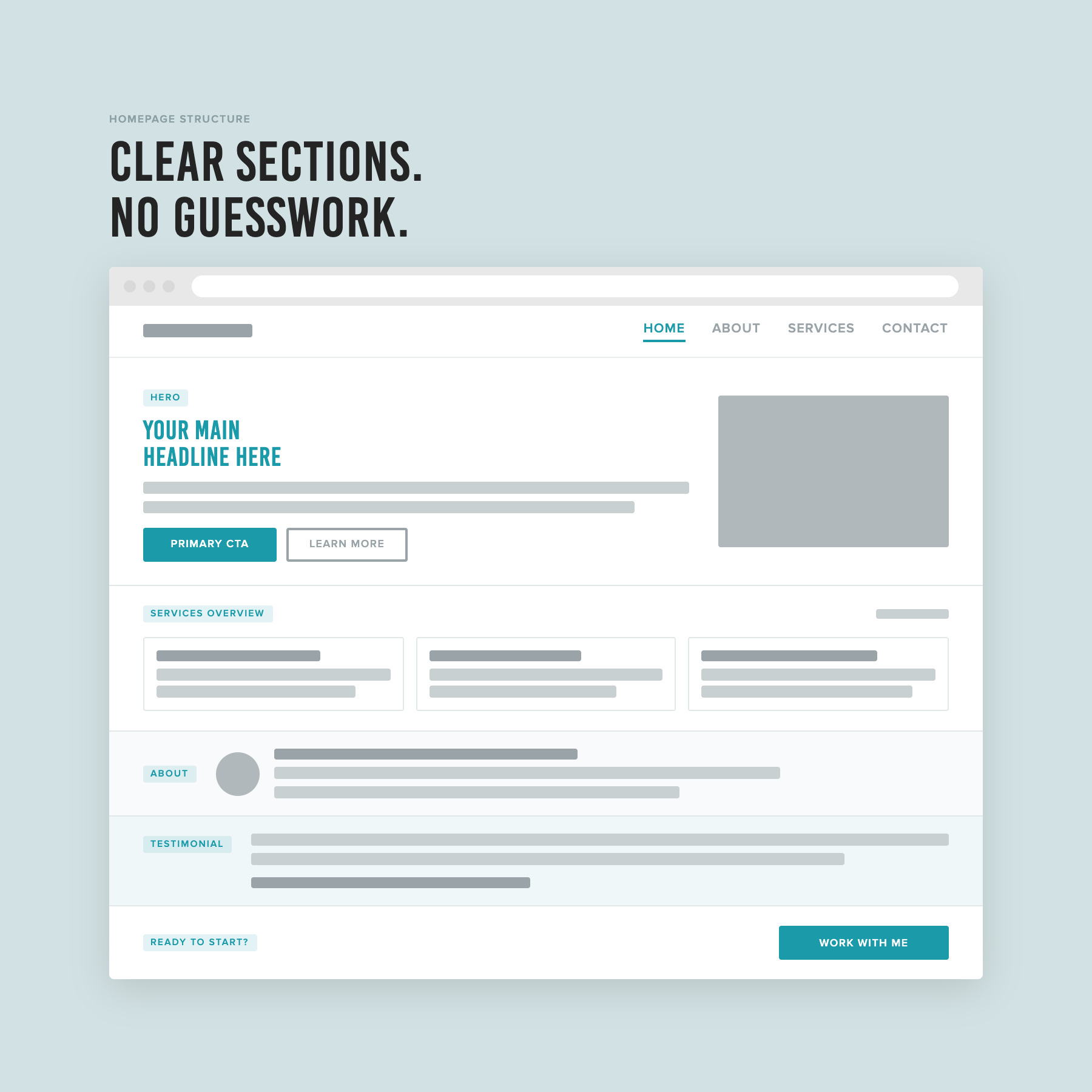
Each section has its own space and a clear path to more. The reader always knows where they are and where to go next.
What should a homepage headline include?
Your homepage headline deserves its own section because it's doing most of the work.
Most people overthink it, but the goal is simple: someone who has never heard of you should be able to read your headline and know immediately what you do and whether it's for them. That's the most important thing your headline needs to do.
Do: write for clarity first. "Bookkeeping for small business owners who hate spreadsheets" tells you exactly what it is and makes the right person feel immediately seen.
Don't: reach for clever before you've nailed clear. Alliteration, analogies, and witty taglines can work, but only once someone already understands what you do. To a stranger landing on your site for the first time, a clever headline with no clear meaning is just confusing. They won't stay to decode it.
Aim for clarity over cleverness. A headline that makes your ideal client immediately nod is doing its job.
Common homepage mistakes to avoid
These are two of the most common mistakes people make when figuring out what to put on their homepage.
Too much content
The most common homepage mistake is trying to put everything on it. The full version of your story, every service explained in detail, the complete process breakdown, testimonials, FAQ, all on one page. The intention is to give people everything they need, but the result is a page that's exhausting to read. Most visitors give up before they get to the important parts.
The good news: if you write your homepage last, this is easier to avoid. By the time you get to it, you already know that each section links out to a dedicated page with the full detail. You're not trying to fit everything in, you're just introducing each part and pointing people through.
No clear structure
The flip side of too much content is a layout problem that's easy to fall into when you know the homepage should be brief.
Some people take "short summary" to mean everything goes in one block. A few lines about services, a line about yourself, a CTA, all sitting together in a single section. But that layout doesn't give each part of your site room to be understood, and it doesn't give the reader a clear sense of where to go next.
Your homepage should walk someone through your site, with each aspect in its own section and a clear CTA button that tells them where to go if they want to know more. Without that structure and signposting, the reader has to work out the hierarchy themselves, and most won't.
Brief doesn't mean minimal. It means focused.
FAQS
What should a homepage include for a service business?
A clear headline, a short intro, a brief overview of your services with a link to learn more, a short about snippet with a link to your about page, a testimonial or trust signal, and a clear call to action. Each element should have its own section with enough space to be read clearly.
How long should a homepage be?
Long enough to cover each section properly, short enough that someone can scan it without feeling overwhelmed. There's no word count to aim for, and the goal is clarity, not a certain length. Each section should be concise and have a button that takes people to the full information on a dedicated page.
Should I put my services on my homepage?
A brief overview, yes. The full detail, no. Your homepage should give someone enough to understand what you offer and whether it's relevant to them. Your services page is where they go to read more.
What makes a good homepage headline?
Clarity. Someone who has never heard of you should be able to read it and immediately understand what you do and who it's for. Clever is a bonus, not a requirement. If you have to choose between memorable and clear, choose clear every time.
The short version
Your homepage doesn't need to do everything. It just needs to make the right person feel like they've landed somewhere that understands them, and give them a clear path to find out more.
Write your about page and your services page first. Then come back to the homepage with fresh eyes and pull the highlights together. You'll find it significantly easier than staring at a blank screen trying to start from nothing.
If you want a step-by-step process for setting up your homepage alongside the rest of your site, that's exactly what The Capsule Template walks you through.
This post is part of a series on setting up your service business website. Read the full series: