You've pulled up the website of someone you really admire in your niche. She's established, she's doing well, and you want to get a feel for how she's structured her services before you sit down to write your own page.
You click on her services menu. There's a dropdown with five options. You click the first one. It has its own page, a full process breakdown, three pricing tiers each with their own names, testimonials, case studies. You go back and click the second option. Same thing. By the time you've looked at three of them you're feeling something you didn't expect: overwhelmed. If this is what a services page is supposed to look like, you have no idea where to start.
Here's the thing: her website is built for where she is now. Yours doesn't need to look like that yet, and honestly, even when you're that established, it still might not even look like that. Her business is not, and never will be, your business.
Here's what actually needs to go on your services page, and how to figure out the right structure for your business specifically.
Do you need one service page or multiple?
There's no universal answer, but there is a useful way to think about it.
When one page is enough
If you can describe a single service clearly in roughly one screen of content (who it's for, what it includes, what someone does next) it probably doesn't need its own dedicated page. If you're writing significantly more than that for one offer, and a visitor would need to scroll considerably just to get through it, that service likely deserves its own page.
When a gateway structure works better
The reason this matters is what happens when someone is trying to compare multiple offers and each one requires a lot of reading. By the time they reach the end of the page, they've forgotten what was at the top. They're not making a clear decision anymore. They're just tired. And the easiest response to that is to close the tab and come back later, which usually means never.
The solution is to use your main services page as a gateway rather than an encyclopedia. Each offer gets a short overview, enough for someone to understand what it is and whether it sounds relevant to them, and then a button that takes them to a dedicated page with the full detail. That dedicated page can be as long as it needs to be, because at that point the reader has already decided they're interested. They're ready to go deeper.
When your offers are closely related
If your offers are closely related and the process is essentially the same across both, you might be fine keeping them on one page. The test is always clarity for the reader: can someone land on this page, scan it, and quickly understand what's available and which option is right for them? If yes, you're fine. If they'd need to work for it, restructure.
And if you only have one offer, or a small number of straightforward services that don't require a lot of explanation, one page is completely fine. You don't need to pad it out or invent extra pages just to make the site feel bigger. A short, clear services page is far more useful than a long, padded one.
Naming and structure matter more than you think
A services page can have all the right information on it and still confuse people, usually because of how that information is organised and labelled.
The other day I was on a website that had creative, thoughtfully named offers. You could tell real care had gone into the branding. But the page structure made it difficult to understand how everything related to each other. There were several offers listed, and within one of them, three tiers, each with its own distinct name and its own separate page. It wasn't immediately clear whether those tier names were separate services entirely or different versions of the same package. It took reading through multiple pages to work out the hierarchy.
Make the hierarchy obvious before you get creative
The fix isn't to abandon creative naming. It's to make the structure of the page do the organising work so readers don't have to. If you have tiered versions of the same offer, make that relationship explicit before you get into the names. Something as simple as "Website Copywriting: Available in three packages" tells the reader immediately what they're looking at. Bronze, Silver, Gold is used everywhere for a reason: people know instantly that these are tiers of the same thing and that the difference is scale or scope. You don't have to use those exact words, but the logic is worth borrowing. Clarity first, creativity second.
Format your services page so people actually read it
Some service providers include a lot of information on their services page: what the offer is, who it's for, what's included, how the process works, how long it takes. All of that can be worth including.
But written as one continuous block with no visual breaks, it's hard to read. The sentences merge together and people tend to skim or skip it altogether, even if the information itself is exactly what they needed.
Sections with clear headers solve this without removing any of the information. Break your service description into labelled parts: what it is, who it's for, what's included, what happens next. Readers can scan, find the part relevant to their question, and read that section properly. The same words, organised differently, become significantly easier to engage with.
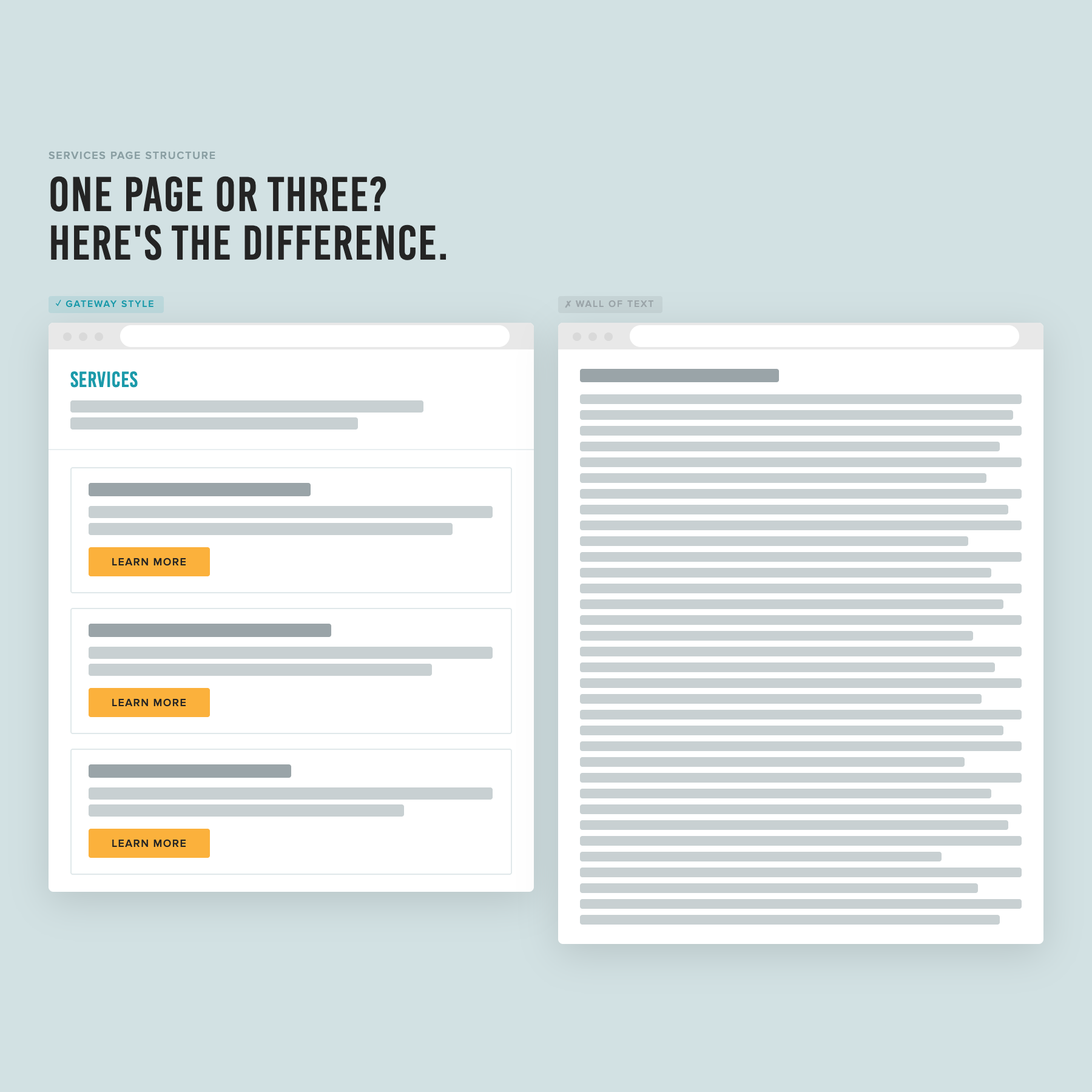
The gateway layout on the left gives each service its own card and a clear next step. The wall of text on the right makes the reader do all the work.
Put your CTA in more than one place
This one is simple but often missed. If your services page is more than a short scroll, don't save your enquire or book a call button for the very end.
Some people will read the whole page. Many won't. Someone might read the overview of your first offer and be ready to get in touch right then. The goal is to make it as easy as possible for them to take that step whenever they're ready, not just at the end of the page when they've finished reading everything.
Add a CTA button at the end of each service description, or at natural pause points throughout the page. They can all link to the same place, whether that’s your contact page, your booking link, or whatever your process is. Multiple buttons going to the same destination isn’t strange, it actually helps reinforce the CTA that you want your reader to take.
The short version
Your services page has one job: make it easy for the right person to understand what you offer and know what to do next. That means a structure that makes sense before they start reading, information that's broken into readable sections, and a clear next step available more than once.
If you want a step-by-step process for setting up your services page alongside the rest of your site, that's exactly what The Capsule Template walks you through.
This post is part of a series on setting up your service business website. Read the full series: